Chat Prompt Template & Chat Prompt-1
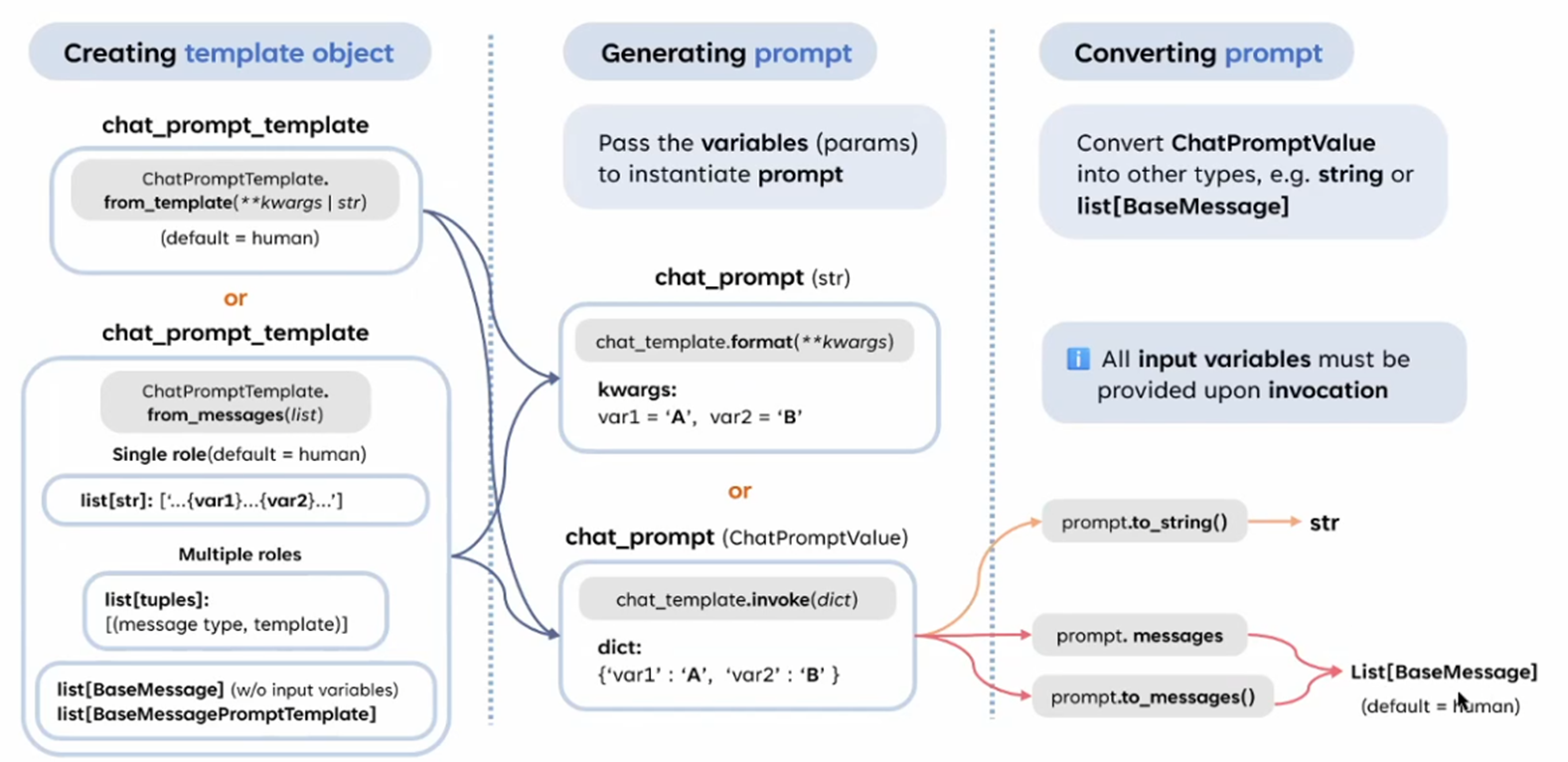
1. Creating Template Object
1.1 ChatPromptTemplate.from_template
-
用於創建單一角色(默認為 human)的模板。
-
可以直接傳遞字符串
str或關鍵字參數kwargs。 -
範例:
from langchain.prompts import ChatPromptTemplate

chat_prompt_template = ChatPromptTemplate.from_template(
    template="What is the capital of {country}?"
1.2 ChatPromptTemplate.from_messages
- 用於創建多角色的模板,適合多輪對話場景。
- 支援以下三種輸入格式:
-
Single role (list[str]):
-
單一角色的消息序列,默認為
human。 -
範例:
ChatPromptTemplate.from_messages(
    messages=["Tell me a joke about {topic}", "Do you know more about it?"]
)
-
-
Multiple roles (list[tuples]):
-
包括角色(
message type)與消息模板的元組。 -
範例:
ChatPromptTemplate.from_messages(
    messages=[
        ("system", "You are a helpful assistant."),
        ("human", "Tell me a joke about {topic}."),
        ("ai", "Here is a joke: Why did the chicken cross the road?")
    ]
)
-
-
BaseMessage object (list[BaseMessage]):
-
可使用 LangChain 的
BaseMessage或BaseMessagePromptTemplate。 -
適合需要進一步自定義角色與行為的場景。
-
範例:
from langchain.schema import HumanMessage, SystemMessage, AIMessage

ChatPromptTemplate.from_messages(
    messages=[
        SystemMessage(content="You are a helpful assistant."),
        HumanMessage(content="Tell me a joke."),
        AIMessage(content="Here is a joke.")
    ]
-
-
2. Generating Prompt
- 目標:將變數插入到模板中以生成具體的 Prompt。
- 方法:
-
.format():-
將變數值插入模板中生成字符串。
-
範例:
chat_prompt = chat_prompt_template.format(country="France")
# 結果:"What is the capital of France?"
-
-
.invoke():-
接受字典形式的參數,生成
ChatPromptValue(更進階的結構)。 -
範例:
chat_prompt = chat_prompt_template.invoke({"country": "France"})
-
-
3. Converting Prompt
- 將生成的 Prompt 轉換為不同的格式,以適應不同的應用場景:
.to_string():- 將
ChatPromptValue轉換為純字符串格式。 - 結果:
str。
- 將
.messages:- 獲取一個
list[BaseMessage],方便用於 Chat Model。 - 默認角色為
human。
- 獲取一個
.to_messages():- 與
.messages相似,但允許進一步的自定義轉換。
- 與
- 提示:所有的輸入變數必須在調用
.format()或.invoke()時提供,否則會拋出錯誤。
應用場景
這種設計使得 LangChain 在處理對話場景時非常靈活,特別是在多輪對話、結構化輸入或工具調用的場景中:
- 多輪對話:
- 使用
ChatPromptTemplate.from_messages()定義多角色交互的上下文。 - 例如用於模擬人類與 AI 的對話。
- 使用
- 結構化上下文:
- 利用
SystemMessage設置模型行為。 HumanMessage與AIMessage定義互動內容。
- 利用
- 工具調用結合:
- 將 ChatPromptValue 轉換為
BaseMessage列表,並作為輸入給 Chat Model 處理。
- 將 ChatPromptValue 轉換為
總結
- ChatPromptTemplate 是 LangChain 處理對話上下文的核心工具。
- 它允許創建單一角色或多角色的 Prompt 模板,並支援靈活的參數插入與輸出格式轉換。
- 通過結合
.format()和.invoke(),以及輸出到字符串或消息列表,可以適應多種應用場景。